Prerequisites
Gearing Up for HomeKey-ESP32
Before you embark on your HomeKey-ESP32 journey, let’s make sure you have the necessary tools and hardware. Think of this as gathering your essentials before a grand adventure! Having these prerequisites in place will ensure a smooth and hassle-free experience.
1. Essential Software
1.1. esptool
You have two options of esptool for flashing the firmware onto your ESP32:
- What it is: A small command-line utility from Espressif that allows you to flash firmware onto your ESP32. It’s the only tool you’ll need from the ESP-IDF ecosystem for this project!
- Why you need it: This magical tool is essential for getting our awesome HomeKey-ESP32 firmware onto your device.
- How to get it: The easiest way to get
esptool.pyis to download it directly from its GitHub releases page. Look for the latest stable release.- esptool.py GitHub Releases
- Or, if you got python installed, it can also be installed through pip
pip install esptool
- What it is: A JavaScript version of
esptoolthat runs directly in your web browser, making the flashing process incredibly simple. - Why you need it: If you prefer a graphical interface and want to avoid command-line tools, this is the way to go!
- How to use it: You’ll access a web page that uses
esptool-jsto flash your ESP32.- Important: This option requires a Chromium-based browser (like Google Chrome, Microsoft Edge, or Brave) as it utilizes the WebSerial API.
- Espressif has put out a demopage where it can be used here: esptool-js
1.2. Python 3.x (Only if using esptool.py)
- What it is: A versatile programming language.
- Why you need it: If you choose to use the command-line
esptool.py, you’ll need a compatible Python installation for it to run correctly on your system. - How to get it: Python usually comes pre-installed on Linux and macOS. For Windows, or if you need a specific version:
2. Hardware You’ll Need
Tip
Avoid powering from a MacBook as they can sometimes not supply enough current to this kind of devices and can result in unexpected behavior of the ESP32 and/or PN532.
The required hardware can be obtained either by sourcing all the parts yourself or by using an integrated PCB that has it all on a single board.
2.1. Option A - Sourcing parts yourself
Tip
It’s recommended to solder the wires if you can, as DuPont connectors may cause connectivity issues.
2.1.1. ESP32 Development Board
- What it is: The brain of your HomeKey-ESP32 device! A microcontroller board with Wi-Fi and Bluetooth capabilities.
- Why you need it: This is where our HomeKey magic lives.
- Recommendation: Any standard ESP32 development board should work, such as the ESP32-DevKitC or NodeMCU-32S.
ESP32 Buyer’s Guide
Note
For the best performance, search for one of the newer variants e.g. ESP32-C6 or ESP32-S3
Generally, any board should be fine. However, some may have non-genuine modules or just cheap flash chips with low endurance. There is no real way of telling which is the better clone. Genuine modules typically have “ESPRESSIF” etched on the metal casing.
Tip
Genuine development boards can be ordered from major distributors like Mouser or Digikey, though it’s pricey compared to something like AliExpress.
2.1.2. PN532 NFC Module
What it is: An NFC (Near Field Communication) reader/writer module.
Why you need it: This module is responsible for reading the HomeKey data from your Apple devices.
Recommendation: Ensure you have a PN532 module that supports SPI communication, as this is what is used by the project.
- For the red board from Elechouse (or clones), there should be a DIP Switch on it. For SPI, the switches should be set to 0 and 1 (left switch down towards 1, right switch up away from 2).
- Avoid using really long wires between the PN532 and ESP32 for the best connectivity, if any issues, try short wires and see if that fixes it.
Choosing Your PN532 Module: A Mini Buyer’s Guide
Note
The information given here won’t guarantee that what you buy will be 100% without issues but aims to guide you toward a better part.
Tip
Boards costing around 4-5€ or less are likely using non-genuine ICs. These boards will still work but expect worse performance
You’ll mostly find boards with two black components parallel to each other near the edge, those are SMD Multilayer RF Inductors. Those are used for the antenna impedance matching which ensure the maximum power is being transferred to the antenna and those are not exactly the best for this, resulting in a less efficient power transfer to the antenna but they are being used as they are typically cheaper.
When shopping for a PN532, check boards with blueish components instead, those are Wire-wound RF inductors that are much superior and assure the antenna gets the power it needs.
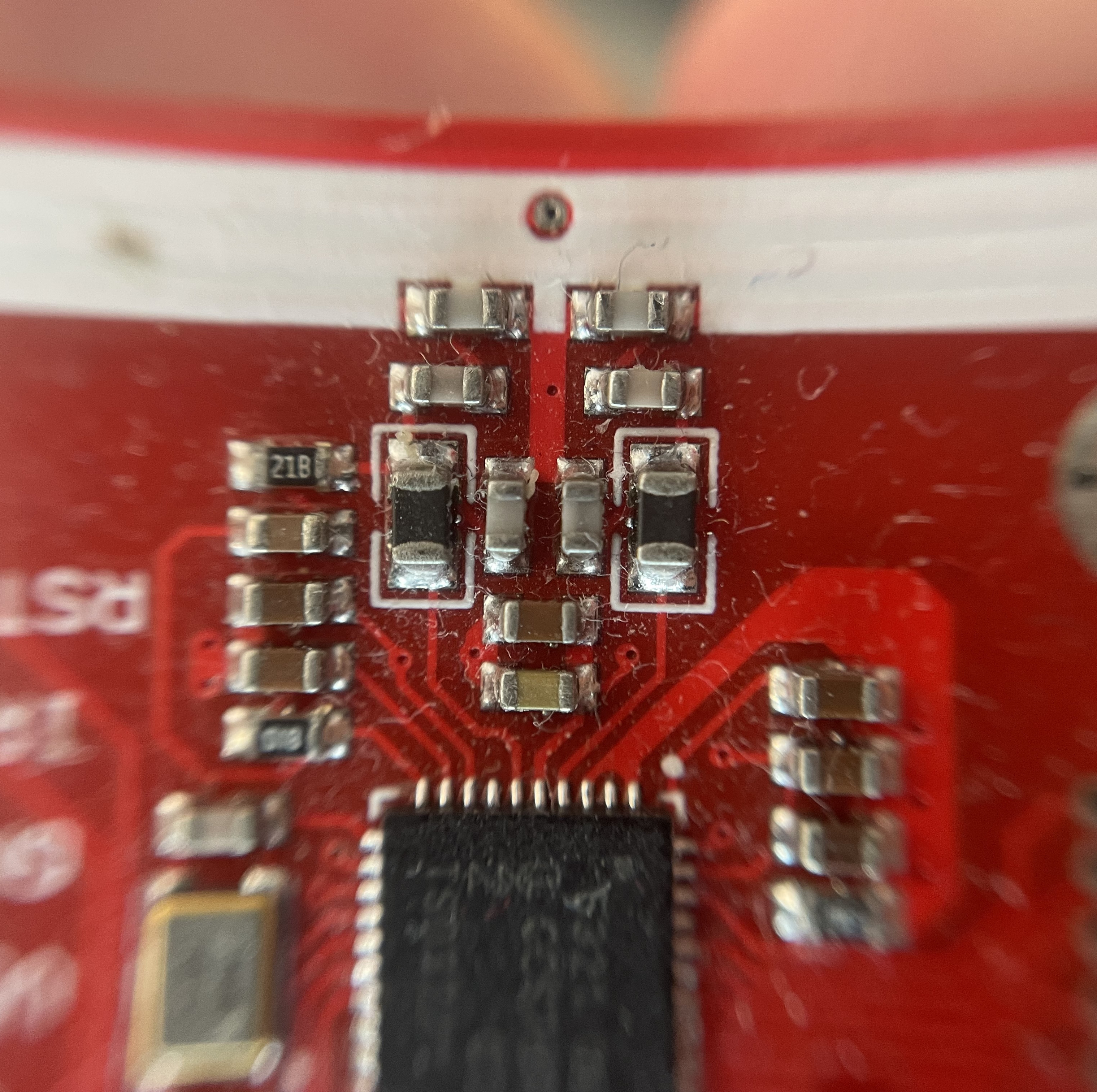
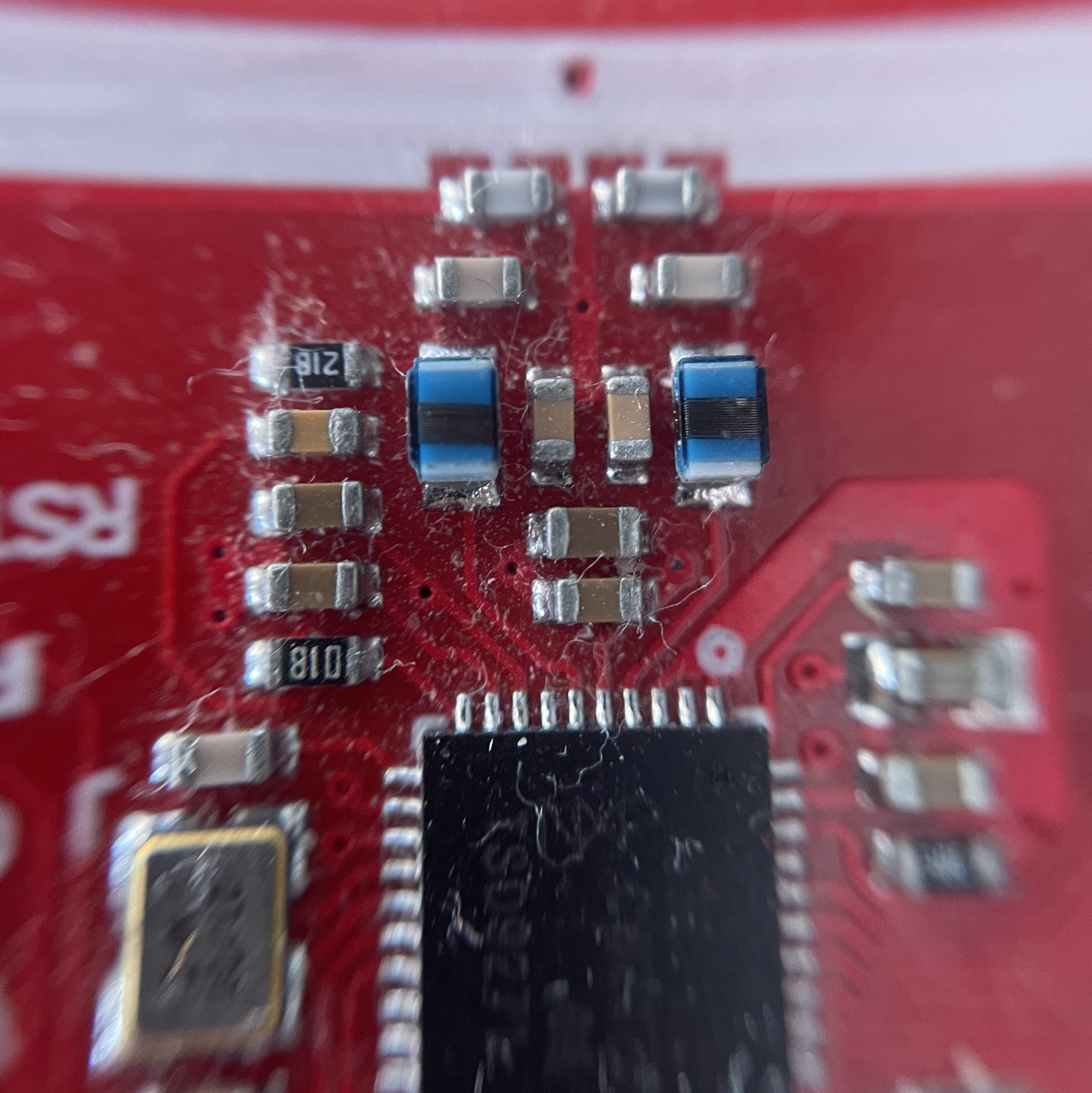
Note: These boards might still not be at peak performance but should have a range of about 3-4cm and be more reliable.
You can also buy from Elechouse for best quality but they are typically more expensive. They are the original designer of those red boards. You can find their PN532 NFC RFID MODULE V4 on their official website here.
2.2. Option B - Integrated PCB Boards
- What they are: Custom-designed Printed Circuit Boards. These boards integrate the ESP32 and PN532, along with other necessary components, into a single, compact solution.
- Why you need them: Using an integrated PCB can significantly simplify wiring, reduce clutter, and result in a more robust and professional-looking final product. They often come with clearly labeled pinouts and dedicated connectors.
- Where you can find one :
- @lollokara’s PCB: This board features an external NFC antenna, RGB LED, and 48V input (alongside USB-C).
- PCB Files: Available on Github here and you can manufacture it where you want, or it can be ordered from PCBWay here.
- There’s two disconnected pads on the top left to the right of the USB-C that need to be soldered(pad bottom-left SEL1 and pad top-right SEL0) to select SPI mode but a manufacturer like PCBWay can handle this, however, they can sometimes misinterpret, so be prepared to put some solder.
- @darkside9009’s PCB: This board comes with an integrated NFC antenna. It’s not open-source, but they claim the PCBs are manufactured in Germany through their own company and can be ordered on Amazon here.
- They also have a version with Ethernet and PoE and an external NFC antenna. It can ordered on Amazon here
- Since there is low demand, they are not keeping a lot of stock so it might not be in stock at the time but you can reach out to them on their official website or on the Discord server and ask if you can order one.
- @lollokara’s PCB: This board features an external NFC antenna, RGB LED, and 48V input (alongside USB-C).
Note: The project and its owner are not affiliated with the aforementioned products or their creators, just providing solutions and praising community efforts.